The Randomizer allows you to randomize some or all of the controls on the Settings tab and on the Lighting tab. The Next Variant button generates a new random set of settings, and the Back button reverts them to the previous state, acting as a local undo function.

Randomization Locks
You may want to exclude certain parameters from randomization. To lock a parameter, click its name on the Settings tab: a little padlock icon appears by the locked parameter name, and subsequent clicks on the Next Variant or Back buttons will not have any effect on it:
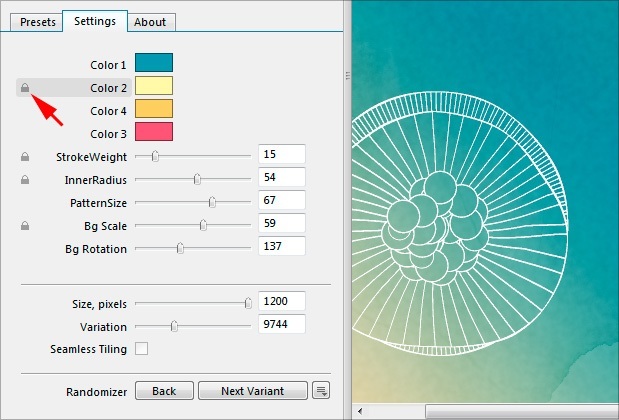
Note that locks are stored per filter, not per preset.
Randomizing Specific Parameters
Sometimes it is convenient to quickly randomize a single parameter without touching the rest. You can do this by Ctrl⌘-clicking the parameter you want to randomize. Alternatively you can do the same via the right-click menu:
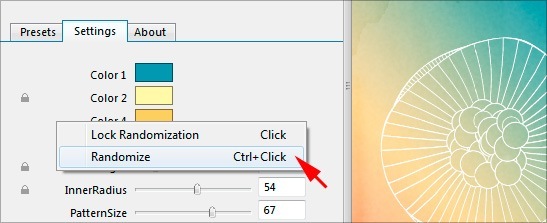
Note that single-parameter randomizations can be rolled back via the Back button, just as with normal, multi-parameter randomizations via the Next Variant button.
Randomizer Settings
The Randomizer Settings menu allows you to unlock all parameters, reset locks and specify randomization level. The menu is accessible by clicking the  button located right next to the other two Randomizer buttons:
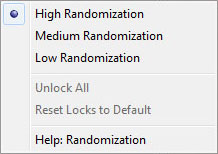
- High Randomization – sets a high degree of randomization. Relationships between the colors of color controls are ignored. This randomization level is good for exploring the filter capabilities.
- Medium Randomization – sets a moderate degree of randomization. The Environment setting on the Lighting tab is not randomized. Relationships between the colors of color controls are preserved. This level of randomization is recommended for the majority of cases.
- Low Randomization – sets a low degree of randomization. Checkbox controls on the Settings tab and the Environment setting on the Lighting tab are not randomized. Relationships between the colors of color controls are preserved. This randomization level is good for creating subtle variations of the original look.
- Unlock All – removes all locks from all parameters.
- Reset Locks to Default – resets all custom locks to the defaults specified by the filter author. This option is only becomes enabled for library filters if you have changed their default randomization locks.


