SpaceRay
 |
On the Dots patterns filters already available in the library and in the forum all have the SAME size and do not have variable sizes and different dots patterns
I have seen this one here 
And I wonder if it would be possible in some way to make this NOT OVERLAPPING DOTS AND VERY TIGHT ARRANGED AS SHOWN IN THE EXAMPLE In bomber you can have different sized dots BUT they are all straight lined and if you try to mix them there is the overlapping problem, and what I want is that none of the dots overlaps as shown in the example And also that there is no spacing between the dots and all are tightly joined together |
|||||
| Posted: July 21, 2012 4:31 am | ||||||
uberzev
 |
Would need to be a custom script...
http://paulbourke.net/texture_colour/randomtile/ |
|||||
| Posted: July 21, 2012 4:39 am | ||||||
Skybase
 |
Ooo we need an iterator for something like this. We tried the bomber in the past if you recall. Basically we fed the previous output the chance param of another bomber. This becomes inefficient after xnum of bombers. But it worked to its degree.
But honestly the bomber method wasn't that great in the end. |
|||||
| Posted: July 21, 2012 6:05 am | ||||||
|
SpaceRay
|
Thanks, I knew it was not going to be easy
 
I have not seen any filter that have any kind of variable dots and is NOT overlapping the results so I thought this would a problem to make in a simple way.
OH, I see that is probably needed to make it better this way, but I can´t script so it will not be possible I can make this Thanks very much for great link!!! Like very much the examples shown on that web page. It would be really great if in FF could be done the things shown on that page. 
Good circles tiling and filling and also on the triangles below 
And also like the straight ones that are not normal either 
And amazing if you can make something like this below 

Very god how the filling follows all the donut shape |
|||||
| Posted: July 21, 2012 10:36 am | ||||||
|
SpaceRay
|
If anyone knows how to make this and make the script to be able to make this kind of things in FF it would be really great and much appreciated.
Thanks very much |
|||||
| Posted: July 21, 2012 5:34 pm | ||||||
|
SpaceRay
|
I have seen that on internet there is much information about this "Random space filling tiling" and is a much desired thing and there are tutorial how to make it BUT all are very technical and complex and only for programmers and the ones who can script and know well what they are doing and not for simple nerd mortals

I will make a short list of what I have found |
|||||
| Posted: July 28, 2012 11:35 pm | ||||||
|
Skybase
|
Hey look pseudo code by Paul Bourke
Not hard yeah? This is helpful though. |
|||||
| Posted: July 29, 2012 12:26 am | ||||||
Sharandra
 |
Would love to see it if someone could write a script for that.

Apart from pretty effects like the ones Ray posted, it could be also useful for less exciting stuff like walls made from irregular sized bricks and stuff like that.I´ve tried bombers but it didn´t work so well. |
|||||
| Posted: July 29, 2012 2:16 am | ||||||
|
SpaceRay
|
Well this could be not hard FOR YOU that have enough experience and skills to know how to use it and know how to script and what to do to make this work.
Thanks for your code suggestion, but I would never know how to implement this inside FF making a script.
YES, I would love too that some expert would be able to write a script in FF that would be able to make this kind of Non Overlapping Random Space Filling and Tiling. Now that you say it, is true that this could be used for many other things and have more uses, thanks for your suggestions |
|||||
| Posted: July 29, 2012 3:24 am | ||||||
|
SpaceRay
|
Compilation of Random Space Filling Tiling articles for FF Filters
The main and very useful and great link given by uberzev Random space filling tiling of the plane all the above examples shown comes from this website ____________________________________________________ Paul Bourke's "tiling of the plane" work was inspired by John Shier, a computer artist who integrates random numbers in his creations. http://john-art.com/ 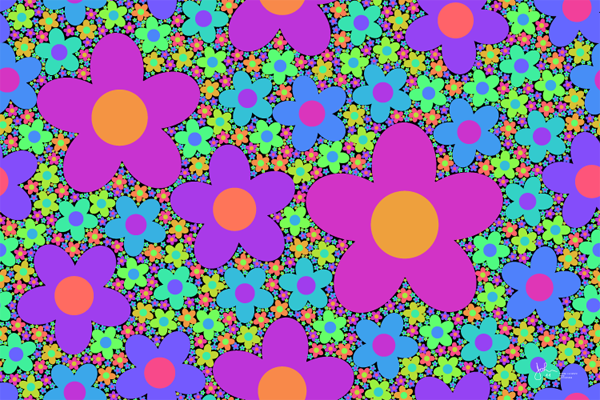
On page 5 of his Gallery you can find lots of examples showing Random Space Filling Gallery 5 examples ________________________________________________________ AND is also very interesting this 10 Page article made in PDF from Paul Bourke and Jhon Shier explaining all this topic of Random Space Filling Filling Space with Random Fractal Non-Overlapping Simple Shapes  |
|||||
| Posted: July 29, 2012 3:55 am | ||||||
|
Skybase
|
*psst spaceray did you know StudioArtist can do this too?
 * just sayin. * just sayin. |
|||||
| Posted: July 29, 2012 3:58 am | ||||||
|
SpaceRay
|
Fr om the Processing Software website
Space Filling Algorithm This has two interesting links to BOX FITTING APPLET A region of space is filled through exhaustive placement of slowly expanding boxes What is very interesting is that this is an working applet wh ere you can make your own BOX FITTING designs online! Do not miss the opportunity to try it yourself Although the only bad thing is that limited to a size of 1000 x 1000 pixels 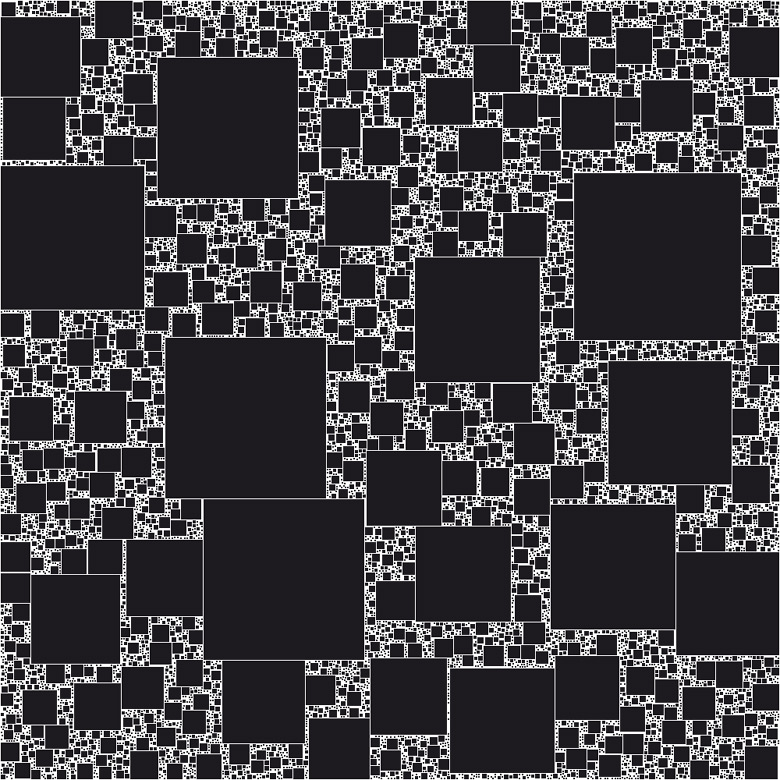
and with gradient colors 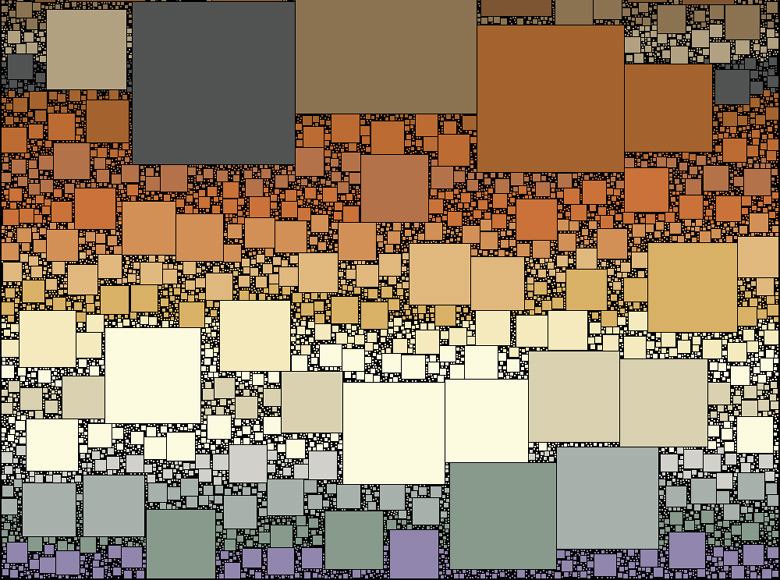
_____________________________________________________________ PACKING ALGORITHM Another name for Space Filling can be Packing Algorithm Packing Algorithm  |
|||||
| Posted: July 29, 2012 4:01 am | ||||||
|
SpaceRay
|
YES ??? Really ? This is excellent news. Please, can you tell me, HOW can Studio Artist do this ???? 
Which of presets or options allows you to make this ?
I have installed Studio Artist Trial and have not seen it as it has too many different options and presets and possible ways to make designs and the preview are very tiny and small to see really what they do and the result you will get |
|||||
| Posted: July 29, 2012 4:16 am | ||||||
|
Skybase
|
One does not simply walk into Studio Artist.
Well, I don't want this thread to become a studio artist thread so email me and I'll explain how things can happen. |
|||||
| Posted: July 29, 2012 5:35 am | ||||||
|
SpaceRay
|
I agree with you, I have been only about 3 hours using Studio Artist, and for a complete beginner using this program is possibly a mess, and wrong way to approach a very well done software like this, as this is not like a "normal home paint" program, this is more oriented to professional like and programmers that like to make their own things Also apart of the 3 hours, I have been also looking in the forums and some videos and more information around the internet about this program. I have seen that the customer service is very good and great, and even the CEO owner contacted me after two of the customer service sent me an answer to only 2 questions I made.
OK, thanks very much, I will do it. |
|||||
| Posted: July 29, 2012 12:52 pm | ||||||
|
SpaceRay
|
I found in google another forum with a similar question like this
Random distribution of objects in space, with no overlap There is 9 pages of posts And also this one Fill a space with non-overlapping objects? |
|||||
| Posted: July 29, 2012 5:19 pm | ||||||
|
Skybase
|
I mean in terms of resource the best one so far is Paul Bourke. He just shows you how to do it in objective C. But I mean if you're comfortable with programming a bit there's the option of using Processing. The last 2 links weren't very resourceful by the way.
I mean if anything the point becomes clear that we're trying to do something extremely specialized stuff here. So it starts becoming more about programming it (which is the fast way) and digging for programs that can do it becomes the hard part. Because usually it becomes part-function of another larger program. (Although I'll guarantee you that StudioArtist will be able to do a good 60% of the things you've listed in the past.) The program's much more "programmable" than anything I ever used. |
|||||
| Posted: July 29, 2012 11:41 pm | ||||||
|
SpaceRay
|
I think that the best way would be that FF Inc. could make an upgrade in the Bomber component with an option that allow to use a "NON OVERLAPPING" option so you could use the bomber to make the same as now BUT with the great difference that the particles would fit inside the available space and not overlap into each other.
|
|||||
| Posted: September 1, 2012 4:54 am | ||||||
ThreeDee
 |
I really wanna try and do this, but first I'm waiting to see if V4 beta is going to make it easier.
|
|||||
| Posted: September 12, 2012 8:12 am | ||||||
|
SpaceRay
|
Thanks really very much for trying to make this, and your wait is over, as the first F 4.0 beta is already available. I think that this thing would be really useful and interesting to have |
|||||
| Posted: September 12, 2012 12:01 pm | ||||||
|
ThreeDee
|
One step in this direction...
Here I have two sets of random circles. The first set is white. The smaller second set (green and blue) is modified in three ways: 1) If there is no overlap with white circles, don't do anything (green circles) 2) If there is partial overlap with white circles, reduce the size of the circle until there is no overlap (blue circles) 3) If there is full overlap with white circles, remove the circles (removed) No scripting, all component-based. Unfortunately it doesn't work in every instance, but that may be because I used offsets, not bombers, so I will try that next.  |
|||||
| Posted: September 12, 2012 2:59 pm | ||||||
|
SpaceRay
|
WOW!! Good idea and good beginning. Although this would be a good way, I think that "perhaps" (probably not) would be easier and better with bombers, as you will need LOTS of circles.
Thanks very much for trying it |
|||||
| Posted: September 12, 2012 3:25 pm | ||||||
Morgantao
 |
Would love to see how you made it with no script. Although I suspect I wouldn't understand anything
|
|||||
| Posted: September 13, 2012 2:34 am | ||||||
|
ThreeDee
|
This is just experimentation. It may turn out that it gets too complex to add more particles. As you can see, the first set of particles are all the same size, so it is easier to "calculate" how much overlap there is with the second set. As the second set is varying sizes, it may become highly convoluted. But we'll see. I'll try the Bomber version now.
|
|||||
| Posted: September 13, 2012 3:35 am | ||||||
|
ThreeDee
|
Four sets of bombers with the incredible overlap-avoiding particle-shrinking formula.
There are some issues, the first one being that since the number of particles is divisible by two (4,6,8,10), you get an empty cross-shaped area where no particles fall. The other one is that the particles for each set start at the same size, so you get too many similar-sized particles (especially the largest ones, which don't get shrunk down at all). The good news is that it works consistently with the Bomber method. And that the other issues can be dealt with.  |
|||||
| Posted: September 13, 2012 11:09 am | ||||||
|
ThreeDee
|
My final attempt without scripts: 5 sets of bombers, 18 minute render time, ridiculously complex method, and still too much empty space.
Well, I guess better to have tried and come close than never to have tried at all. I can safely conclude this is better done with a single script component than with my 143-component (no joke) monster.  |
|||||
| Posted: September 13, 2012 12:50 pm | ||||||
|
ThreeDee
|
Moving my attempts over to the Scripting section thread.
|
|||||
| Posted: September 13, 2012 2:04 pm | ||||||
|
Morgantao
|
I guess a script or an itterator is the only practical way to go.
Still, I would love to see the logic part that checks the overlap and shrinks the shape till there's no overlap. |
|||||
| Posted: September 13, 2012 4:25 pm | ||||||
|
SpaceRay
|
Very good attempts you have made but as you say doing it this way is NOT the way to go as it would be too complex and too slow, although very good that you have tried it.
Do you mean something like this shown here below for SA? Building an Apollonian Gasket using MSG Although in my trial version there is no MSG advanced editor , only MSG Generic
Or this Vectorizer Close Packed Circles I have tried this and works but in very low resolution and can´t really see it well, as it is the trial, and I can´t afford to buy it althouh I would love to. If it is not like this I will email you. |
|||||
| Posted: September 14, 2012 5:10 am | ||||||
|
ThreeDee
|
It is very convoluted. I don't know if it can be figured out from the construction of the filter, but here you go. It is so unautomatic that you can't even change the repeat amounts of the different bombers without creating overlaps or larger gaps (unless you change the Tone curves for each set). Non-overlapping particles.ffxml |
|||||
| Posted: September 14, 2012 6:01 am | ||||||
|
SpaceRay
|
What happened to this?
Is there any kind of progress and have you ThreeDee or anyother found a way or figured it out how to make this? |
|||||
| Posted: October 10, 2012 4:48 am | ||||||
|
Skybase
|
Bump. what happened?
|
|||||
| Posted: October 10, 2012 5:12 am | ||||||
|
SpaceRay
|
Is ThreeDee missing again? The last message is from 26 October, one month ago.
I am still wanting to find a way to make this in Filter Forge OR with any other software or custom program or whatever way you may know. I could use Photoshop or Illustrator in Windows 7 (if there could be possibly any plugin or addon) |
|||||
| Posted: November 26, 2012 10:57 am | ||||||
|
SpaceRay
|
The ThreeDee filter project shown above continues here in this other dedicated thread seen here --> Pattern Filling (or circle packing) and he has shown the great examples made by Quasimondo's artworks with this technique
Also there are more threads related to this: Make this in FF? - Digital Circlism - Artwork with hundreds of circles And this other one --> Compilation of Random Space Filling Tiling articles for FF Filters |
|||||
| Posted: December 11, 2012 2:31 am | ||||||
|
SpaceRay
|
WOW!! I have discovered something very interesting about this that I did not notice before

I have written above:
Well, if you go to the applet, and open the one that puts "middle" you will see below that is already given the source code for making this box fitting images AND the program that is used to create this and is Processing, and I have already downloaded and installed the free Processing program and downloaded this source code AND IT WORKS !!! Although as I do not know nothing about programming I can´t change the settings but I can change the resolution and also it seems that there is a possible way to save this in higher resolutions (this is not included in the code)
VERY IMPORTANT FOR MAKING IT WORK If you download the source code and load it inside Processing software it will tell you that this code needs to be updated, and will not work, BUT the fix is very easy, just change the framerate word for the frameRate word (change the R to uppercase) and now it will work. Also if it uses a image or color source image you need to change the link in the code to put your own image source from a link in internet or put the image you want inside the processing folder so it can find it ----------------------------------------------------------------- I am now tempted and perhaps interested in learning more about the Processing language and see how it works and how can be customized this source code to get good effects. specially for working with the IMAGE SOURCE BASED version of this box fitting packing that is found Here I have done and example linking the code with the FF Lifesaver image and changing the resolution (there is two places that needs to be changed for this to work) and I got this here below  |
|||||
| Posted: December 28, 2012 3:01 am | ||||||
|
SpaceRay
|
And here I have used the link of the FF website of the Kingfisher
By the way, the link in the source code must be full inside and between the quotes "" 
What I can´t change and do not know for now is how to change the boxes sizes that are generated and now they appear randomly and with the size that they want or according to the instructions in the source code and do not know how to change them and be able to configure the size of them.  |
|||||
| Posted: December 28, 2012 3:22 am | ||||||
|
SpaceRay
|
After having used the Particles, Physics, and Dynamics of Cinema 4D software (only the trial as I can´t buy it) and now having used the free available Unity 3D software that has also very similar physics, dynamics and particles, where you can easily define the collision detection so the is NO overlapping between them, and you can apply a force so they are tightly arranged in the minimum space available, I have though that all the above examples could be done using the Unity 3D software to get this effect
As it seems is very difficult and is not yet know if really could be possible or not to make inside FF, and as I can´t use Processing graphics software programming language to make this, and also do not know how to make it by programming in other software, or also as alternative use the programming of the Studio Artist 4.0 software, I think I could try to get it with Unity 3D and even easier using some of the additional available assets for Unity to help in this topic. All this comes because I have just found an image that has been done with the Chipmunk Physics software that is for making this kind also, so if this can be done with this Chipmunk software, I think it will be possible to make it with Unity 3D too. Here is the image example  |
|||||
| Posted: March 29, 2014 7:44 am | ||||||
|
Yuya
|
Exactly what I was talking about ages ago. I said use a physics engine. You really don't need external ones, absolutely no need for Chipmunk Physics I don't think, default might do nice.
|
|||||
| Posted: March 29, 2014 7:49 am | ||||||
EAdams

Posts: 448 |
I downloaded the Box Fitting Photoshop plugin years ago from the Richard Rosenman website - I always loved the effect it produced. It looks like the same effect you are talking about.
|
|||||
| Posted: March 29, 2014 11:49 am | ||||||
|
Yuya
|
Richard Rosenman's work with plugins have always been phenomenal in terms of experimentation. But they haven't deserved the love over the last couple years. The plugins are probably 32bit still and not updated. They probably work regardless.
--- on a fun note --- Just something I did in StudioArtist.  |
|||||
| Posted: March 29, 2014 8:42 pm | ||||||
|
ThreeDee
|
Ok, well, there's an idea for a simpler version of scripted circle packing, which your mention of a physics engine somehow gave birth to: instead of just making the new circle the largest it can be in a certain spot, find the closest three circles and center the new circle between them. Might need to re-check that the same three circles are still the nearest after moving, but otherwise should work quite nicely.
|
|||||
| Posted: March 30, 2014 12:24 pm | ||||||
|
SpaceRay
|
ThreeDee, Would be possible some kind of "physics" in 2D with LUA that could work in filter forge?
|
|||||
| Posted: October 30, 2014 5:40 am | ||||||
|
SpaceRay
|
I have just noticed and seen that the last news from this main topic was at the end of 2012, 2 years ago!!
Maybe Vladimir Golovin or anyone from the FF developers team could have some possible idea to make this available in FF 5.0 As said it would be really great and awesome if there could be some way to make NON OVERLAPPING textures and creations as it happens with the 3D software that you can use dynamics physics to make objects that they do not overlap each other It would be really great if the bomber (or maybe an additional component) could make that the generated particles would NOT overlap in the result |
|||||
| Posted: November 1, 2014 5:46 am | ||||||
LexArt

Posts: 256 |
Great and very interesting thread, would be very good that FF could have non-overlapping particles option
Thanks very much to all who have contributed to make this thread |
|||||
| Posted: May 14, 2016 4:46 am | ||||||
Join Our Community!
Filter Forge has a thriving, vibrant, knowledgeable user community. Feel free to join us and have fun!
33,849 Registered Users
+12 new in 30 days!
153,797 Posts
+7 new in 7 days!
15,392 Topics
+44 new in year!
Online Users Last minute:
6 unregistered users.
Recent Forum Posts:
- Luminosity Photo Mosaic v1.0 by Mehmet Sensoy by SpaceRay
September 25, 2026 - Numerology by ThreeDee by SpaceRay
September 25, 2026 - Fungi : FiberBubbles 0 by Ramlyn by Ramlyn
September 25, 2026 - Linear Recession by Chris Goldthorpe by SpaceRay
September 22, 2026 - Repeat and Recede using Mask by Chris Goldthorpe by SpaceRay
September 22, 2026 - Library Thumbnail archive and Copyright by Cliff3D
August 28, 2026 - Chaos Fields by Rachel Duim
August 18, 2026 - Foreign Planet by ZZ_NT by Cliff3D
August 18, 2026 - Too many Loop iterations in "Foregin Planet" filter make Win11 crash by Ramlyn
August 17, 2026 - Creating 8BF filters with Filter Forge by GMM
August 12, 2026 - Japanese Wood Art by Ramlyn by Ramlyn
August 8, 2026 - Filter Forge 15 and Photoshop Elements on Mac by Claus
August 7, 2026


