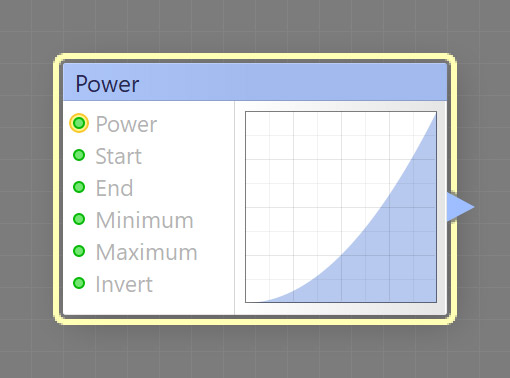
The Power component generates a parabola whose power is determined by the Power input. This is a curve component, it can be located in the Curves category on the Components Bar.
Determines the parabola power: the value of 2 corresponds to Quadratic parabola (y = x^2), the value of 3 – to Cubic (y = x^3), the value of 4 – to Quartic (y = x^4), and the value of 5 – to Quintic parabola (y = x^5).
When a map component is connected to this input, the power value is determined separately for different image areas by the HDR brightness level of the image supplied by that component. The number is calculated as the brightness level rounded to the nearest integer: the brightness level of 0 to 0.5 corresponds to the Power of 2, the level of 0.5 to 1.5 to the Power of 3, etc. Out-of-range values are clipped, which corresponds to the last item of the list.
Start and End: Map Inputs
Start and End define the starting and ending points of the curve. When the Start value is greater than the End value, they get reversed – the Start parameter defines the End value and vice versa. This is needed to avoid flipping the curve horizontally. Since Start and End are map inputs, their values can be controlled separately for different image areas by connecting a map component to any of these inputs.
Minimum and Maximum: Map Inputs
Minimum and Maximum define the output range of the curve. When the Minimum value is greater than the Maximum value, they get reversed – the Minimum parameter defines the Maximum value and vice versa. This is needed to avoid turning the curve upside down. Since Minimum and Maximum are map inputs, their values can be controlled separately for different image areas by connecting a map component to any of these inputs.
Invert: Map Input
Inverts the curve, converting its value at each point to its opposite: 0.05 to 0.95, 0.25 to 0.75 etc. Invert is applied to the curve before Minimum and Maximum take effect, so they still define the output range correctly. When a map component is connected to this input, the state of the checkbox is determined separately for different image areas by the brightness level of the image supplied by that component. The brightness level of 0 to 50 corresponds to unchecked Invert, and the level of 50 to 100 corresponds to checked Invert.


